MMKV是一个key-value存储的库,下面笔者来分析下它的源代码(v1.0.2)。
C函数
MMKV中使用了一些C语言提供的内存和文件相关的函数,下面先列举出来:
文件相关函数
int open(const char *, int, ...); 将给定的文件路径以指定flags和指定mode打开,返回file descriptor。具体flags和mode的取值可以参看头文件注释。
int ftruncate(int fd, off_t length); 将open函数返回的file descriptor中指向的文件大小改为length指定的大小。如果原来文件大小大于length的话,则超过部分会被丢弃。
int fstat(int, struct stat *buf); 给定open函数返回的file descriptor,返回该文件描述符指向的文件的文件信息,将其存储在buf指针指向的结构体中。
int stat(const char *file_name, struct stat *buf); 给定文件名,返回该文件对应的文件信息,将其存储在buf指针指向的结构体中。
int lstat(const char *file_name, struct stat *buf); 和stat函数功能一样,只是当文件是符号链接时,lstat返回的是该符号链接的信息。
内存相关函数
void *memcpy(void *__dst, const void *__src, size_t __n); 将src地址开始的连续n个字节数据复制到以dst地址开始的空间内。
void *memset(void *__b, int __c, size_t __len); 将b地址开始的前len个字节全部设置为c。当b指向一段字符时,c也可以为char类型,实际设置的则是该字符对应的ASCII码值。
void *mmap(void *start, size_t length, int prot, int flags, int fd, off_t offsize); 将open函数返回的file descriptor中长为length的部分对应到以start地址(设置为nullptr系统会自动分配,然后返回)开始的内存区域中。实现操作内存映射到文件中,也就是对内存的读写也就是对文件的读写。offsize表示文件偏移量,一般设置位0表示从文件最开始部分开始映射。此时需要将flags设置为MAP_SHARED。
int msync(void *addr, size_t len, int flags); 将mmap建立的内存文件映射进行同步。
int mlock(const void *addr, size_t len); 将内存指定大小加锁,主要是当程序在后台时防止操作系统将该段内存所在的页调度到交换空间(swap area)。
int munlock(const void *addr, size_t len); 将内存指定大小解锁。
Protocol Buffer
MMKV使用PB来进行数据的序列化存储
PB是Google开源的一种通信协议,和XML的功能是类似的,PB使用varint来压缩数据,这样节约了存储空间,提高了传输速度。
varint
-
使用最少的字节来保存一个数字,比如一个int32_t的value存1,原本需要4个字节,而实际这个数字只占用了一个字节,所以使用该种方式只需要占用一个字节就可以保存改数字了。
-
这种方式的每个字节的第一位有特殊含义,如果该位为1说明后续的字节是该数字的一部分;如果该位为0,说明此时的字节就是该数字的最后一个字节。
而且PB使用了小端的方式来存储,也就是第一个字节存储了数字的最低位。 大端则第一个字节存储了最高位。
举个例子,在PB的varint下,150二进制存储为9601,变换如下所示:
96 01 = 1001 0110  0000 0001
       → 000 0001  ++  001 0110 (去掉首位标志位,倒置字节顺序)
       → 10010110
       → 128 + 16 + 4 + 2 = 150
编码 & 解码
前面说到MMKV使用PB进行数据序列化,实际工程中使用下面三个类进行二进制编码和解码。
MiniCodedOutputData
该类用于编码
uint8_t *m_ptr;
size_t m_size;
int32_t m_position;

MiniCodedOutputData::MiniCodedOutputData(void *ptr, size_t len)
    : m_ptr((uint8_t *) ptr), m_size(len), m_position(0) {
}

MiniCodedOutputData::MiniCodedOutputData(NSMutableData *oData)
    : m_ptr((uint8_t *) oData.mutableBytes), m_size(oData.length), m_position(0) {
}
上面是该类的属性和两个构造方法,用于初始化data指针和data长度以及当前position。为接下来往data中写数据做好准备。
write
write方法分为四类,varint,浮点型(float & double),string,data四种, 其中varint和浮点型内部都会调用writeRawByte来将一个字节的数据存进data中。
- byte
将一个字节的数据存储到data中很简单,首先判断位置有没有越界,然后一个简单的赋值操作:
void MiniCodedOutputData::writeRawByte(uint8_t value) {
	if (m_position == m_size) {
		NSString *reason = [NSString stringWithFormat:@"position: %d, bufferLength: %u", m_position, (unsigned int) m_size];
		@throw [NSException exceptionWithName:@"OutOfSpace" reason:reason userInfo:nil];
	}

	m_ptr[m_position++] = value;
}- varint
write varint时分32位和64位,下面以32位为例来说明:
一个while循环:
- 1.首先判断这个value是不是不大于7位;
- 1.1 如果不大于7位,直接write一个字节,首字节为0,代表了这就是该value的最后一个字节;最后返回
- 1.2 如果大于7位,首页取value低位开始的七位,同时首位设置为1,代表该value后面还有字节;
- 1.2.1 将value右移7位,继续回到步骤1
void MiniCodedOutputData::writeRawVarint32(int32_t value) {
	while (YES) {
		if ((value & ~0x7f) == 0) {
			this->writeRawByte(value);
			return;
		} else {
			this->writeRawByte((value & 0x7f) | 0x80);
			value = logicalRightShift32(value, 7);
		}
	}
}- 浮点型
write 浮点型没有使用varint,所以每个字节的8位都是用来存放数据的,下面以float来举例说明:
- 第一次取低位的8位,即一个字节的数据,write进data;
- 右移value8位,继续取低位的8位,即一个字节的数据,write进data;
- 右移value16位,继续取低位的8位,即一个字节的数据,write进data;
- 右移value24位,继续取低位的8位,即一个字节的数据,write进data;
此时32位数据已经全部write进data。
void MiniCodedOutputData::writeRawLittleEndian32(int32_t value) {
	this->writeRawByte((value) &0xff);
	this->writeRawByte((value >> 8) & 0xff);
	this->writeRawByte((value >> 16) & 0xff);
	this->writeRawByte((value >> 24) & 0xff);
}- string
write string 相比之前的两种少了位运算和移位操作,不过多了一个存储string length的操作,然后调用NSString的getBytes:maxLength:usedLength:encoding:options:range:remainingRange:方法将string中的bytes数据存入我们给定的data的位置中。
void MiniCodedOutputData::writeString(NSString *value) {
	NSUInteger numberOfBytes = [value lengthOfBytesUsingEncoding:NSUTF8StringEncoding];
	this->writeRawVarint32((int32_t) numberOfBytes);
	[value getBytes:m_ptr + m_position
	         maxLength:numberOfBytes
	        usedLength:0
	          encoding:NSUTF8StringEncoding
	           options:0
	             range:NSMakeRange(0, value.length)
	    remainingRange:nullptr];
	m_position += numberOfBytes;
}- data
write data 分为两种,一种存储了data length,叫做writeRawData; 另一种则存储data length叫做writeData;
然后调用C函数memcpy将data中的bytes数据拷贝到我们MiniCodedOutputData中的data中。
void MiniCodedOutputData::writeData(NSData *value) {
	this->writeRawVarint32((int32_t) value.length);
	this->writeRawData(value);
}

void MiniCodedOutputData::writeRawData(NSData *value, int32_t offset, int32_t length) {
	if (length <= 0) {
		return;
	}
	if (m_size - m_position >= length) {
		memcpy(m_ptr + m_position, ((uint8_t *) value.bytes) + offset, length);
		m_position += length;
	} else {
		[NSException exceptionWithName:@"Space" reason:@"too much data than calc" userInfo:nil];
	}
}
MiniCodedInputData
该类用于解码,
uint8_t *m_ptr;
int32_t m_size;
int32_t m_position;

MiniCodedInputData::MiniCodedInputData(NSData *oData)
    : m_ptr((uint8_t *) oData.bytes), m_size((int32_t) oData.length), m_position(0) {
}上面是该类的三个属性和一个构造方法,和MiniCodedOutputData类似,一个区别是此时给m_ptr赋值的是data的bytes属性,通过该属性不能改变data中的数据。
read
read方法同样分为四类,varint,浮点型(float & double),string,data四种, 其中varint和浮点型内部都会调用readRawByte来读取一个字节的数据。
- byte
判断position有没有越界,然后从data中取一个字节的数据返回。
int8_t MiniCodedInputData::readRawByte() {
	if (m_position == m_size) {
		NSString *reason = [NSString stringWithFormat:@"reach end, bufferPos: %d, bufferSize: %d", m_position, m_size];
		@throw [NSException exceptionWithName:@"InvalidProtocolBuffer" reason:reason userInfo:nil];
		return -1;
	}
	int8_t *bytes = (int8_t *) m_ptr;
	return bytes[m_position++];
}- varint
read varint时分32位和64位
64位 varint
初始化shift为0,result(int64_t)为0,一个while循环:
- 1.首先判断shift是否小于64
- 1.1 如果shift小于64,根据当前position读取一个字节的数据,将该字节的低7位左移shift位,放入result非0的低7位;
- 1.2 如果读取的该字节数据最高位为0,那么说明这个int后面没有其他字节,所以直接返回result;
- 1.3 shift加7,继续回到步骤1
int64_t MiniCodedInputData::readRawVarint64() {
	int32_t shift = 0;
	int64_t result = 0;
	while (shift < 64) {
		int8_t b = this->readRawByte();
		result |= (int64_t)(b & 0x7f) << shift;
		if ((b & 0x80) == 0) {
			return result;
		}
		shift += 7;
	}
	@throw [NSException exceptionWithName:@"InvalidProtocolBuffer" reason:@"malformedVarint" userInfo:nil];
	return -1;
}
32位 varint
读取32位和64位类似,不过在读取32位int的时候,方法内部进行了位数判断,如果可能的话会丢弃高32位存储的字节数据。
int32_t MiniCodedInputData::readRawVarint32() {
	int8_t tmp = this->readRawByte();
	if (tmp >= 0) {
		return tmp;
	}
	int32_t result = tmp & 0x7f;
	if ((tmp = this->readRawByte()) >= 0) {
		result |= tmp << 7;
	} else {
		result |= (tmp & 0x7f) << 7;
		if ((tmp = this->readRawByte()) >= 0) {
			result |= tmp << 14;
		} else {
			result |= (tmp & 0x7f) << 14;
			if ((tmp = this->readRawByte()) >= 0) {
				result |= tmp << 21;
			} else {
				result |= (tmp & 0x7f) << 21;
				result |= (tmp = this->readRawByte()) << 28;
				if (tmp < 0) {
					// discard upper 32 bits.
					for (int i = 0; i < 5; i++) {
						if (this->readRawByte() >= 0) {
							return result;
						}
					}
					@throw [NSException exceptionWithName:@"InvalidProtocolBuffer" reason:@"malformedVarint" userInfo:nil];
					return -1;
				}
			}
		}
	}
	return result;
}- 浮点型
write 浮点型没有使用varint,所以read 浮点型同样也不需要使用 read varint的方式,下面以float来说明:
依次读取4个字节的数据,将其依次放入int32_t的32位中返回, 比read varint简单不少。
int32_t MiniCodedInputData::readRawLittleEndian32() {
	int8_t b1 = this->readRawByte();
	int8_t b2 = this->readRawByte();
	int8_t b3 = this->readRawByte();
	int8_t b4 = this->readRawByte();
	return (((int32_t) b1 & 0xff)) |
	       (((int32_t) b2 & 0xff) << 8) |
	       (((int32_t) b3 & 0xff) << 16) |
	       (((int32_t) b4 & 0xff) << 24);
}- string
同样的read string没有位运算和移位操作,
记得之前我们write string的时候,是先write了string length,然后存储了string本身的bytes,所以这里read string的时候,首先调用readRawVarint32取到string的length,然后进行下面判断:
-
- size > 0 && size <= (m_size - m_position),使用NSString的
initWithBytes:length:encoding方法初始化string,position加上size,返回string。
- size > 0 && size <= (m_size - m_position),使用NSString的
-
- size == 0, 返回空字符串。
-
- size < 0, 返回nil。
NSString *MiniCodedInputData::readString() {
	int32_t size = this->readRawVarint32();
	if (size <= (m_size - m_position) && size > 0) {
		NSString *result = [[NSString alloc] initWithBytes:(m_ptr + m_position)
		                                            length:size
		                                          encoding:NSUTF8StringEncoding];
		m_position += size;
		return result;
	} else if (size == 0) {
		return @"";
	} else if (size < 0) {
		@throw [NSException exceptionWithName:@"InvalidProtocolBuffer" reason:@"negativeSize" userInfo:nil];
		return nil;
	} else {
		@throw [NSException exceptionWithName:@"InvalidProtocolBuffer" reason:@"truncatedMessage" userInfo:nil];
	}
	return nil;
}- data
和read string一样,首先获取data的size,然后使用NSData的dataWithBytes:length:初始化result,position加上size,返回result。
NSData *MiniCodedInputData::readData() {
	int32_t size = this->readRawVarint32();
	if (size <= m_size - m_position && size > 0) {
		NSData *result = [NSData dataWithBytes:(m_ptr + m_position) length:size];
		m_position += size;
		return result;
	} else if (size < 0) {
		@throw [NSException exceptionWithName:@"InvalidProtocolBuffer" reason:@"negativeSize" userInfo:nil];
		return nil;
	}
	return nil;
}
MiniPBCoder
这个类主要是用于object的编码和解码。
该类会用到
MiniPBEncodeItem结构体, 结构体中属性如下所示:
MiniPBEncodeItemType type;
int32_t compiledSize; // object的size 加上 object size的length 的size
int32_t valueSize; // object的size
union {
    void *objectValue;
    void *tmpObjectValue; // this object should release on dealloc
} value;
encode
+ (NSData *)encodeDataWithObject:(id)obj; 方法实现如下:
-
根据object构建
m_encodeItems,这个属性类型为std::vector<MiniPBEncodeItem> *,用来存放解析object后的MiniPBEncodeItem结构体。具体实现在- (size_t)prepareObjectForEncode:(NSObject *)obj方法中。 -
根据
- (size_t)prepareObjectForEncode:(NSObject *)obj返回的index,从m_encodeItems中取到MiniPBEncodeItem结构体,根据该结构的compiledSize创建m_outputBuffer, 用m_outputBuffer创建m_outputData准备将数据写进m_outputBuffer中,这一步在getEncodeData方法中。
当object为字典时,需要返回第一个存储字典的encodeItem结构体的索引,因为该结构体中存放了这个字典正确的size, 所谓正确的size指的是字典所有key,value的
compiledSize的和作为字典的valueSize,然后计算出字典的compiledSize。
- 最后一步,遍历
m_encodeItems,根据MiniPBEncodeItem的type 调用MiniCodedOutputData不同的write方法,将object中的数据写进m_outputBuffer中。 这一步在writeRootObject方法中。
这里需要注意的一点就是
writeRootObject中,当object为字典时,会首先在返回的data中写入该字典的valueSize。
decode
decode有两种,一种是非container类型(NSString, NSData, NSDate类型),另一种就是container类型(NSDictionary)。
非container类型
+ (id)decodeObjectOfClass:(Class)cls fromData:(NSData *)oData; 方法实现如下:
-
使用oData初始化
m_inputBuffer, 用m_inputBuffer初始化m_inputData。 -
调用
decodeOneObject:ofClass:方法,该方法根据cls类型调用MiniCodedInputData不同的read方法,将read的结果直接返回。
container类型
+ (id)decodeContainerOfClass:(Class)cls withValueClass:(Class)valueClass fromData:(NSData *)oData; 方法实现如下:
-
使用oData初始化
m_inputBuffer, 用m_inputBuffer初始化m_inputData。 -
判断cls类型,如果是字典类型,则调用
decodeOneDictionaryOfValueClass:方法解析字典中内容。 -
创建一个可变的字典,首先跳过存储字典size的字节,然后while循环,首先读key调用
MiniCodedInputData的readString方法,然后读value依然调用decodeOneObject:ofClass:方法,判断value是否为nil,不为空则将key,value存到可变字典中,为空则从可变字典中移除该key对应的value。直到data遍历结束。
笔者这部分就不贴代码了,可以自行去MiniPBCoder类中查看。
接口
MMKV提供了一系列的set&get的方法,类似NSUserDefaults。
MMKV *mmkv = [MMKV defaultMMKV];

[mmkv setBool:YES forKey:@"bool"];
BOOL bValue = [mmkv getBoolForKey:@"bool"];

[mmkv setInt32:-1024 forKey:@"int32"];
int32_t iValue = [mmkv getInt32ForKey:@"int32"];

[mmkv setObject:@"hello, mmkv" forKey:@"string"];
NSString *str = [mmkv getObjectOfClass:NSString.class forKey:@"string"];
以上代码从MMKV Demo中摘录,我们可以发现使用起来和NSUserDefaults十分类似。
set
MMKV提供给我们的各种类型的set方法,其实内部都是通过将不同类型的数据先转成二进制形式,然后内部再调用setData:forKey:完成存储。
- (BOOL)setData:(NSData *)data forKey:(NSString *)key {
	if (data.length <= 0 || key.length <= 0) {
		return NO;
	}
	CScopedLock lock(m_lock);

	[m_dic setObject:data forKey:key];

	return [self appendData:data forKey:key];
}m_dic是MMKV内部一个可变字典,相当于一个内存存储,这样取的时候可以直接从m_dic 获取。然后将这个key和data尝试拼接到文件的后面。这个拼接操作是set方法中最复杂的部分了,主要分为以下几步:
首先计算key的value的size,然后调用ensureMemorySize:判断当前文件是否有足够的空间存储这对key&value。
- (BOOL)appendData:(NSData *)data forKey:(NSString *)key {
	size_t keyLength = [key lengthOfBytesUsingEncoding:NSUTF8StringEncoding];
	size_t size = keyLength + pbRawVarint32Size((int32_t) keyLength); // size needed to encode the key
	size += data.length + pbRawVarint32Size((int32_t) data.length);   // size needed to encode the value

	BOOL hasEnoughSize = [self ensureMemorySize:size];
	if (hasEnoughSize == NO || [self isFileValid] == NO) {
			return NO;
	}

	...
}
ensureMemorySize: 方法首先会尝试调用loadFromFile,为写新的key&value做准备,通常情况下MMKV在初始化的时候就会调用loadFromFile,不过当出现内存警告的时候,MMKV会清除内存缓存,所以这里会尝试加载。
- (void)checkLoadData {
	//	CScopedLock lock(m_lock);

	if (m_needLoadFromFile == NO) {
		return;
	}
	m_needLoadFromFile = NO;
	[self loadFromFile];
}

- (BOOL)ensureMemorySize:(size_t)newSize {
	[self checkLoadData];

	...
}loadFromFile主要的工作是,调用open打开沙盒中文件,根据文件大小和默认的内存页大小设置文件的大小记做m_size;
- (void)loadFromFile {
	m_fd = open(m_path.UTF8String, O_RDWR, S_IRWXU);
	if (m_fd < 0) {
		MMKVError(@"fail to open:%@, %s", m_path, strerror(errno));
	} else {
		m_size = 0;
		struct stat st = {};
		if (fstat(m_fd, &st) != -1) {
			m_size = (size_t) st.st_size;
		}
		// round up to (n * pagesize)
		if (m_size < DEFAULT_MMAP_SIZE || (m_size % DEFAULT_MMAP_SIZE != 0)) {
			m_size = ((m_size / DEFAULT_MMAP_SIZE) + 1) * DEFAULT_MMAP_SIZE;
			if (ftruncate(m_fd, m_size) != 0) {
				MMKVError(@"fail to truncate [%@] to size %zu, %s", m_mmapID, m_size, strerror(errno));
				m_size = (size_t) st.st_size;
				return;
			}
		}

	...
}然后使用mmap建立文件内存映射。尝试读取当前文件的大小,设置m_actualSize。
m_actualSize为0,此时文件中还没有内容,设置m_output从offset开始,data中前面的四个字节用来存储m_actualSize;
m_actualSize大于0:
- 实际存储的data size大于
m_size,此时调用writeAcutalSize:将文件的m_actualSize设置为0,设置m_output从offset开始,忽略之前的数据。 - 实际存储的data size小于
m_size, 此时会判断文件是否通过CRC校验,没有通过则和上一步做同样的操作;通过的话则取出存储数据的data初始化m_dic,更新m_output存储位置。
- (void)loadFromFile {
	...

	m_ptr = (char *) mmap(nullptr, m_size, PROT_READ | PROT_WRITE, MAP_SHARED, m_fd, 0);
	if (m_ptr == MAP_FAILED) {
		MMKVError(@"fail to mmap [%@], %s", m_mmapID, strerror(errno));
	} else {
		const int offset = pbFixed32Size(0);
		NSData *lenBuffer = [NSData dataWithBytesNoCopy:m_ptr length:offset freeWhenDone:NO];
		@try {
			m_actualSize = MiniCodedInputData(lenBuffer).readFixed32();
		} @catch (NSException *exception) {
			MMKVError(@"%@", exception);
		}
		MMKVInfo(@"loading [%@] with %zu size in total, file size is %zu", m_mmapID, m_actualSize, m_size);
		if (m_actualSize > 0) {
			if (m_actualSize < m_size && m_actualSize + offset <= m_size) {
				if ([self checkFileCRCValid] == YES) {
					NSData *inputBuffer = [NSData dataWithBytesNoCopy:m_ptr + offset length:m_actualSize freeWhenDone:NO];
					if (m_cryptor) {
						inputBuffer = decryptBuffer(*m_cryptor, inputBuffer);
					}
					m_dic = [MiniPBCoder decodeContainerOfClass:NSMutableDictionary.class withValueClass:NSData.class fromData:inputBuffer];
					m_output = new MiniCodedOutputData(m_ptr + offset + m_actualSize, m_size - offset - m_actualSize);
				} else {
					[self writeAcutalSize:0];
					m_output = new MiniCodedOutputData(m_ptr + offset, m_size - offset);
					[self recaculateCRCDigest];
				}
			} else {
				MMKVError(@"load [%@] error: %zu size in total, file size is %zu", m_mmapID, m_actualSize, m_size);
				[self writeAcutalSize:0];
				m_output = new MiniCodedOutputData(m_ptr + offset, m_size - offset);
				[self recaculateCRCDigest];
			}
		} else {
			m_output = new MiniCodedOutputData(m_ptr + offset, m_size - offset);
			[self recaculateCRCDigest];
		}
		MMKVInfo(@"loaded [%@] with %zu values", m_mmapID, (unsigned long) m_dic.count);
	}
	if (m_dic == nil) {
		m_dic = [NSMutableDictionary dictionary];
	}
	...
}确定m_output有效后,ensureMemorySize:会判断需要存储的newSize 与 当前文件剩余size的关系:
如果足够,直接返回YES。
如果不够,此时会计算出当前文件总的需要存储的size记做lenNeeded(offset+当前文件去重的size+newSize),和未来需要的size记做futureUsage。将二者和m_size进行比较:
- 如果不够,则将
m_size加倍,直到足够存储lenNeeded+futureUsage。将文件的size扩展,重新建立文件内存的映射更新m_ptr,最后更新m_output。
- (BOOL)ensureMemorySize:(size_t)newSize {
	...

	if (newSize >= m_output->spaceLeft()) {
		// try a full rewrite to make space
		static const int offset = pbFixed32Size(0);
		NSData *data = [MiniPBCoder encodeDataWithObject:m_dic];
		size_t lenNeeded = data.length + offset + newSize;
		size_t futureUsage = newSize * std::max<size_t>(8, (m_dic.count + 1) / 2);
		// 1. no space for a full rewrite, double it
		// 2. or space is not large enough for future usage, double it to avoid frequently full rewrite
		if (lenNeeded >= m_size || (lenNeeded + futureUsage) >= m_size) {
			size_t oldSize = m_size;
			do {
				m_size *= 2;
			} while (lenNeeded + futureUsage >= m_size);
			MMKVInfo(@"extending [%@] file size from %zu to %zu, incoming size:%zu, futrue usage:%zu",
			         m_mmapID, oldSize, m_size, newSize, futureUsage);

			// if we can't extend size, rollback to old state
			if (ftruncate(m_fd, m_size) != 0) {
				MMKVError(@"fail to truncate [%@] to size %zu, %s", m_mmapID, m_size, strerror(errno));
				m_size = oldSize;
				return NO;
			}

			if (munmap(m_ptr, oldSize) != 0) {
				MMKVError(@"fail to munmap [%@], %s", m_mmapID, strerror(errno));
			}
			m_ptr = (char *) mmap(m_ptr, m_size, PROT_READ | PROT_WRITE, MAP_SHARED, m_fd, 0);
			if (m_ptr == MAP_FAILED) {
				MMKVError(@"fail to mmap [%@], %s", m_mmapID, strerror(errno));
			}

			// check if we fail to make more space
			if (![self isFileValid]) {
				MMKVWarning(@"[%@] file not valid", m_mmapID);
				return NO;
			}
			// keep m_output consistent with m_ptr -- writeAcutalSize: may fail
			delete m_output;
			m_output = new MiniCodedOutputData(m_ptr + offset, m_size - offset);
			m_output->seek(m_actualSize);
		}

	...
}- 如果够,则直接将去重后的data的length更新
m_actualSize,再一次更新m_putput,最后将去重的data写进文件中。去掉了加倍m_size这一步。
得到去重的data只需要将
m_dic转为data重新写入文件,因为字典是不重复的,就达到了去重的效果。
- (BOOL)ensureMemorySize:(size_t)newSize {
	...
	NSData *data = [MiniPBCoder encodeDataWithObject:m_dic];

	if ([self writeAcutalSize:data.length] == NO) {
		return NO;
	}

	delete m_output;
	m_output = new MiniCodedOutputData(m_ptr + offset, m_size - offset);
	BOOL ret = [self protectFromBackgroundWritting:m_actualSize
										writeBlock:^(MiniCodedOutputData *output) {
											output->writeRawData(data);
										}];

	...

}ensureMemorySize:方法调用结束后,接下来就是实际的存储新的key&value。此时分为两种情况:
- 当
m_actualSize为0,也就是此时文件中还没有内容,将当前m_dic转为data,用该data更新m_actualSize,同时将该data写进文件。 - 当
m_actualSize不为0,更新m_actualSize,将key&value写进文件末尾。
当
m_actualSize为0时将m_dic转为data写进文件时,调用的是writeRawData是因为在将m_dic转data的时候已经将key&value的length写进data中了,所以就不要调用writeData了。
- (BOOL)appendData:(NSData *)data forKey:(NSString *)key {
	...

	if (m_actualSize == 0) {
		NSData *allData = [MiniPBCoder encodeDataWithObject:m_dic];
		if (allData.length > 0) {
			if (m_cryptor) {
				m_cryptor->reset();
				auto ptr = (unsigned char *) allData.bytes;
				m_cryptor->encrypt(ptr, ptr, allData.length);
			}
			BOOL ret = [self writeAcutalSize:allData.length];
			if (ret) {
				ret = [self protectFromBackgroundWritting:m_actualSize
				                               writeBlock:^(MiniCodedOutputData *output) {
					                               output->writeRawData(allData); // note: don't write size of data
				                               }];
				if (ret) {
					[self recaculateCRCDigest];
				}
			}
			return ret;
		}
		return NO;
	} else {
		BOOL ret = [self writeAcutalSize:m_actualSize + size];
		if (ret) {
			static const int offset = pbFixed32Size(0);
			ret = [self protectFromBackgroundWritting:size
			                               writeBlock:^(MiniCodedOutputData *output) {
				                               output->writeString(key);
				                               output->writeData(data); // note: write size of data
			                               }];
			if (ret) {
				auto ptr = (uint8_t *) m_ptr + offset + m_actualSize - size;
				if (m_cryptor) {
					m_cryptor->encrypt(ptr, ptr, size);
				}
				[self updateCRCDigest:ptr withSize:size];
			}
		}
		return ret;
	}
}最后说下在protectFromBackgroundWritting:writeBlock:中计算mlock参数的部分。
mlock的addr参数得是pageSize的倍数。所以下面代码其实是在寻找到需要写data所在的页。
static const int offset = pbFixed32Size(0);
static const int pagesize = getpagesize();
size_t realOffset = offset + m_actualSize - size;
size_t pageOffset = (realOffset / pagesize) * pagesize;
size_t pointerOffset = realOffset - pageOffset;
size_t mmapSize = offset + m_actualSize - pageOffset;
char *ptr = m_ptr + pageOffset;
if (mlock(ptr, mmapSize) != 0) {
	MMKVError(@"fail to mlock [%@], %s", m_mmapID, strerror(errno));
	// just fail on this condition, otherwise app will crash anyway
	//block(m_output);
	return NO;
} else {
	@try {
		MiniCodedOutputData output(ptr + pointerOffset, size);
		block(&output);
		m_output->seek(size);
	} @catch (NSException *exception) {
		MMKVError(@"%@", exception);
		return NO;
	} @finally {
		munlock(ptr, mmapSize);
	}
}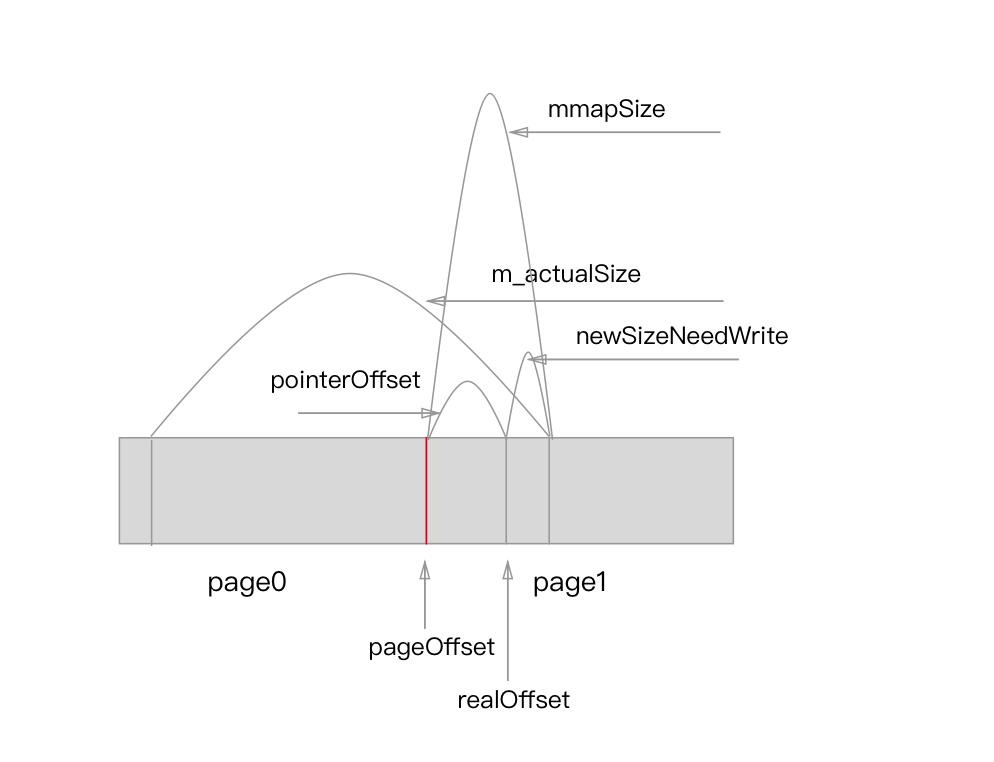
如图所示,最后我们计算出mlock的addr参数ptr,和len参数mmapSize,最后将文件从ptr+pointerOffset开始,length为size的区域开始将新加入的key&value写进文件,最后将m_outputseek size。
get
get方法首先根据key从m_dic中取到该key对应的data数据,然后使用MiniCodedInputData或者MiniPBCoder从data中读取到数据将其返回,相比set方法,get方法就简单多了。
- (NSData *)getDataForKey:(NSString *)key {
	CScopedLock lock(m_lock);
	[self checkLoadData];
	return [m_dic objectForKey:key];
}
- (bool)getBoolForKey:(NSString *)key {
	return [self getBoolForKey:key defaultValue:FALSE];
}
- (bool)getBoolForKey:(NSString *)key defaultValue:(bool)defaultValue {
	if (key.length <= 0) {
		return defaultValue;
	}
	NSData *data = [self getDataForKey:key];
	if (data.length > 0) {
		@try {
			MiniCodedInputData input(data);
			return input.readBool();
		} @catch (NSException *exception) {
			MMKVError(@"%@", exception);
		}
	}
	return defaultValue;
}
CRC校验
CRC校验的原理其实很直观,通过在需要校验的数据后附加一串数记做extra。
这个extra怎么产生的呢,首先我们选定一个除数,一般以一个多项式表示,比如多项式为x^5+ x^1 + 1,对应的二进制为100011,我们就将这个二进制作为除数。
假设这个除数为k位,我们首先将需要发送的数据后补 k-1 个0,也就是计算出的余数的位数。然后将原先我们需要发送的数据对这个除数做”模2除法”,得到的余数就作为extra,注意这个余数的位数一定是 k-1 位,哪怕前面是0是不能省略的。
此时我们需要发送的数据后增加了extra,也就是这个余数,当接受方收到后首先用同样的除数做”模2除法”,正常情况应该余数为0,如果余数不为0则说明校验失败。
模2除法其实很简单,不需要进位,各位进行异或操作即可;
假设我们需要发送的数据为100101110,多项式为x^5 + x^4 + x + 1, 除数也就是110011,所以我们需要将数据后补5个0。
             11101011
110011 |-----------------
       |10010111000000
	   |110011
	   ---------------
	     101101
		 110011
		 -------------
		  111101
		  110011
		  ------------
		    111000
			110011
			----------
			  101100
			  110011
			  --------
			   111110
			   110011
			   --------
			     11010
经过上面的模2除法,我们得到余数为11010。
MMKV中使用了crc32(cyclic redundancy check)中来检测数据是否正确。当数据初始化、数据重组时会将CRC文件中数据重置,也就是对当前文件中持久化的所有数据进行一次校验将结果存进crc文件中。当正常从文件尾部appendData时,会将新插入的数据进行CRC校验的结果存到crc文件后面。当需要校验时,只需要将crc文件中的存储的校验数值和对当前文件中存储的数据调用crc32函数返回的值进行比较即可。
- (BOOL)checkFileCRCValid {
	if (m_ptr != nullptr && m_ptr != MAP_FAILED) {
		int offset = pbFixed32Size(0);
		m_crcDigest = (uint32_t) crc32(0, (const uint8_t *) m_ptr + offset, (uint32_t) m_actualSize);

		// for backward compatibility
		if (!isFileExist(m_crcPath)) {
			MMKVInfo(@"crc32 file not found:%@", m_crcPath);
			return YES;
		}
		NSData *oData = [NSData dataWithContentsOfFile:m_crcPath];
		uint32_t crc32 = 0;
		@try {
			MiniCodedInputData input(oData);
			crc32 = input.readFixed32();
		} @catch (NSException *exception) {
			MMKVError(@"%@", exception);
		}
		if (m_crcDigest == crc32) {
			return YES;
		}
		MMKVError(@"check crc [%@] fail, crc32:%u, m_crcDigest:%u", m_mmapID, crc32, m_crcDigest);
	}
	return NO;
}
文件布局
我们实际使用,来看看使用MMKV存储的文件格式。
MMKV *mmkv = [MMKV defaultMMKV];
int times = 7;
while (times > 0) {
    [mmkv setInt32:150 forKey:@"int"];
    times -= 1;
}
上面代码我们将int作为key,150作为value存储起来,我们打开沙盒里的文件,内容如下所示:
3200 0000 0703 696e 7402 9601 0369 6e74
0296 0103 696e 7402 9601 0369 6e74 0296
0103 696e 7402 9601 0369 6e74 0296 0103
696e 7402 9601 0000 0000 0000 0000 0000
0000 0000 0000 0000 0000 0000 0000 0000
0000 0000 0000 0000 0000 0000 0000 0000
0000 0000 0000 0000 0000 0000 0000 0000
0000 0000 0000 0000 0000 0000 0000 0000
.... 后面全部为0
- 前面4个字节其实就是
m_actualSize -
后面
0703 696e 7402 9601 -
07标记了这个map的size -
03 696e 74表示key int的length(03),和key int 的内容(696e 74) -
02 9601表示value 150的length(02),和 valye 150的内容(9601)
References
https://developers.google.com/protocol-buffers/docs/encoding